Build Trading Bots
Without Code
Create professional MetaTrader 5 Expert Advisors with our visual strategy builder. Design, test, and export your trading algorithms in minutes.
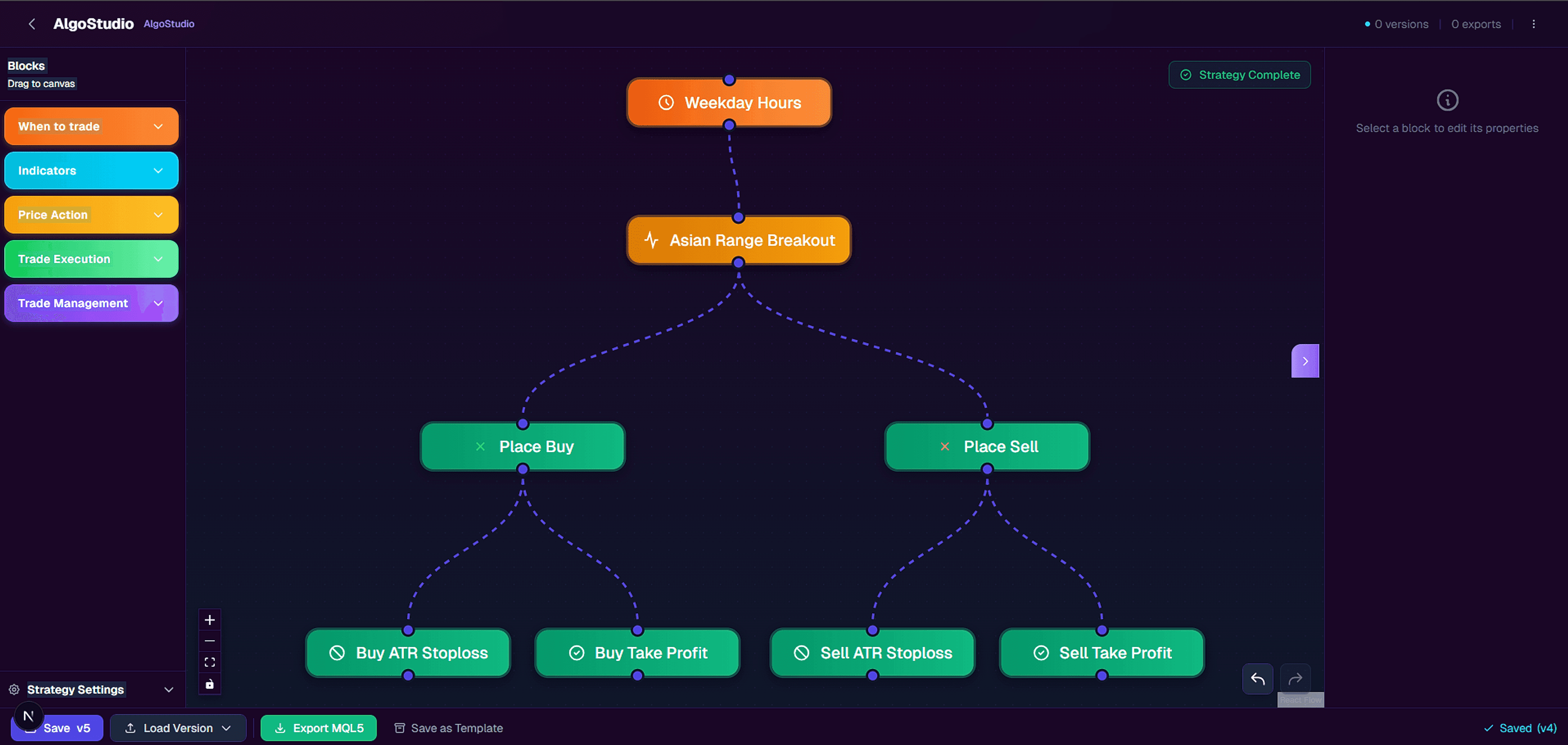
Everything you need to automate your trading
Professional tools, simplified for everyone
Visual Strategy Builder
Drag and drop indicators, conditions, and actions. Build complex strategies without touching code.
One-Click Export
Export your strategy directly to MetaTrader 5. Get compiled EA files ready to trade.
Fast Iteration
Make changes instantly. Test ideas quickly without recompiling manually.
How it works
From idea to live trading in three steps
Design Your Strategy
Use our visual builder to define entry and exit conditions with technical indicators.
Configure Parameters
Set risk management, lot sizes, and trading hours to match your style.
Export & Trade
Download your EA file and load it into MetaTrader 5. Start trading.
Build MT5 Expert Advisors without coding
Building a MetaTrader 5 Expert Advisor traditionally requires learning MQL5 — a C++-based programming language that takes months to master. For most traders, this is an impossible barrier between their strategy ideas and live automated trading.
AlgoStudio removes that barrier completely. Instead of writing hundreds of lines of code, you design your strategy visually by connecting blocks on a canvas. Each block represents a trading concept you already understand: indicators like Moving Averages, RSI, and MACD; actions like Place Buy and Place Sell; and risk management tools like Stop Loss and Take Profit.
When you're done, AlgoStudio generates clean, well-commented MQL5 source code that you can export directly into MetaTrader 5. The code is production-ready — with proper indicator handles, error handling, and clearly marked input parameters for optimization in the MT5 Strategy Tester.
How the visual strategy builder works
AlgoStudio's drag-and-drop canvas lets you build complete trading strategies without touching code. Every strategy is composed of five types of blocks that you connect to define your trading logic:
- Timing— Control when your EA trades. Choose from always-on, specific trading sessions (London, New York, Tokyo), custom time windows, or day-of-week filters.
- Indicators— Define entry conditions using Moving Averages, RSI, MACD, Bollinger Bands, ATR, ADX, Stochastic, and more. Set periods, levels, and crossover conditions visually.
- Price Action— React to candlestick patterns, support/resistance zones, and range breakouts without writing pattern-matching code.
- Trading— Execute buy and sell orders and close positions. Connect these to your indicator conditions to automate entries and exits.
- Risk— Protect your capital with stop loss, take profit, trailing stops, break-even rules, and daily trade limits — all configurable per block.
Connect the blocks on the canvas and your entire strategy is visible at a glance. No jumping between files, no debugging syntax errors, no guessing what your EA does.
Who is AlgoStudio for?
Beginners exploring automated trading
You've heard about Expert Advisors and want to try automated trading, but don't know MQL5 and don't want to spend months learning to code. AlgoStudio lets you start with a free template and have your first EA running in under 5 minutes.
Manual traders who want to automate
You have a profitable manual strategy but can't watch charts 24 hours a day. You want your rules executed consistently — without emotion, fatigue, or missed setups. AlgoStudio turns your existing strategy into a working EA that trades while you sleep.
Experienced traders testing new ideas
You know what you want to test, but writing MQL5 from scratch for every idea is slow. With AlgoStudio you can prototype and export three strategies in the time it takes to code one. Iterate faster, backtest more, and find edges that work.
Why visual EA building beats manual coding
MQL5 is a powerful language, but it wasn't designed for rapid strategy prototyping. A simple Moving Average crossover EA requires 200+ lines of code: indicator buffer initialization, tick event handling, order management, error handling, and deinitialization. Change one condition and you risk introducing a bug that takes hours to find.
With AlgoStudio's visual builder, the same strategy is 5 connected blocks on a canvas. Want to swap RSI for Stochastic? Drag a new block. Want to add an ADX trend filter? Connect one more block. Every change takes seconds, not hours — and the generated code is always syntactically correct.
This isn't about dumbing down EA development. It's about removing the accidental complexity (syntax, compilation, debugging) so you can focus on what actually matters: your trading logic. The exported MQL5 code is clean, readable, and fully editable in MetaEditor if you want to customize it further.
The result: you test more ideas, iterate faster, and find profitable strategies sooner. That's the real edge.
Trusted by traders worldwide
Build strategies for the world's most popular trading platform
Works with MetaTrader 5 on any broker
Frequently asked questions
Do I need coding experience?
What do I get with the free plan?
Can I use the exported EA in live trading?
What indicators are supported?
Can I cancel my subscription anytime?
Is the generated MQL5 code editable?
Simple pricing
Start free, upgrade when you need more
Ready to automate your trading?
Join traders who build their own Expert Advisors without writing code.
Start Building Free